When building or upgrading a video surveillance system, one of the most common questions is:
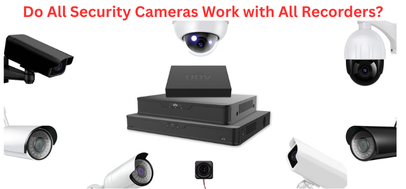
Do All Security Cameras Work with All Recorders?
Short answer: No.
Camera compatibility depends on the camera type, signal format, and communication protocol of your recording device.
This guide explains how different cameras and recorders pair together — helping you choose the right equipment the first time.
🎥 Analog Cameras vs. IP Cameras — Why Compatibility Matters
Different cameras produce different types of video signals:
| Camera Type | Common Signal | Required Recorder |
|---|---|---|
| Analog CCTV | Coaxial / BNC (CVBS, HD-TVI, HD-CVI, AHD) | DVR |
| IP Network Camera | Digital data via Ethernet | NVR |
If the recorder cannot decode the camera’s signal format, it cannot record or display the video.
Even when the physical connection fits, communication protocols must match for the devices to work properly.
🧠 Can Any CCTV Camera Work with Any NVR?
No — an NVR only works with IP cameras that support compatible:
✔ Resolution
✔ Encoding format (H.264 / H.265)
✔ ONVIF / private protocol compatibility
✔ PoE or network configuration
✔ Power method (PoE vs separate power)
💡 Some NVRs only support cameras from their own brand (closed systems), while others support ONVIF-compliant third-party cameras (open systems).
Before buying, always check the manufacturer’s compatibility list — or let Secure It Global handle it for you.
💾 Can I Use Security Cameras Without an NVR?
Yes — but there are limitations:
| Without an NVR | Limitation |
|---|---|
| Built-in SD card recording | Small storage, no video backup |
| Direct-to-phone / PC streaming | No long-term retention |
| Cloud recording only | Monthly fees, needs internet |
| Standalone setups | Harder to scale beyond a few cameras |
If the camera fails or is stolen, your footage may be lost forever.
📡 What Happens if Wi-Fi Fails and There’s No NVR?
Wireless IP cameras rely on network connectivity.
If the Wi-Fi drops:
Live view stops
Remote viewing fails
Cloud recording stops
Alerts and analytics stop
Some cameras with SD cards may continue recording — but only locally, increasing the risk of data loss.
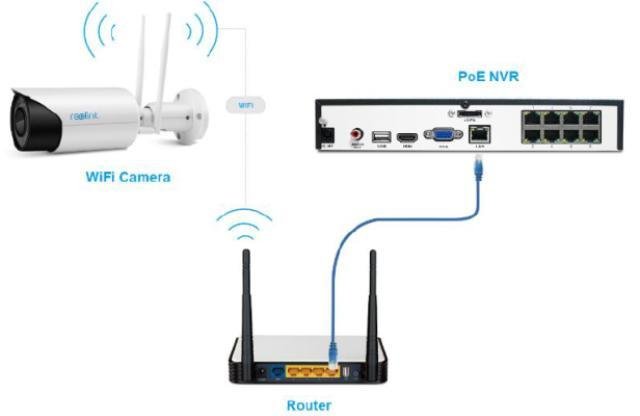
🔌Can IP Cameras Connect Directly to an NVR?
Yes — especially if your NVR includes PoE ports.
One Ethernet cable provides power + data
Plug-and-play setup — NVR auto-discovers compatible cameras
No need for a separate switch (up to the NVR’s PoE limit)
If you need more cameras than PoE ports support, a PoE network switch expands the system.
🌐 Does an NVR Need to Be Connected to a Router?
Not always.
| NVR Setup | Router Needed? | What You Get |
|---|---|---|
| Local closed system | ❌ No | Local-only recording & viewing |
| Remote access needed | ✅ Yes | View cameras anywhere using app |
Connecting to a router also enhances:
✔ Cybersecurity
✔ Firmware updates
✔ System scalability
🔄 Can I Mix Different Security Camera Brands and Types?
Yes — with the right setup.
Checklist for mixing cameras:
All cameras use a compatible format (IP or analog)
Recording resolution matches
Same video standard (NTSC / PAL)
Correct cabling (Coax vs Ethernet)
Compatible power method (PoE / 12V DC)
ONVIF support for different brands
Hybrid DVR/NVR recorders allow mixing analog + IP cameras in one system.
🖥️ Can I Use a Computer as a Security Recorder?
Yes — through VMS (Video Management Software) like:
Blue Iris • Milestone • UniView EZStation • Hanwha Wisenet WAVE
Benefits:
Low-cost optional DIY solution
Flexible integration & analytics
Remote access support
Limitations:
Requires a powerful PC
Risk of crashes or malware
Not ideal for long-term storage
Requires technical knowledge
➡️ A PC software system works, but a purpose-built NVR is more reliable for 24/7 surveillance.
To ensure your system delivers high-quality, secure, and future-proof protection:
✔ Choose an NVR that supports ONVIF & scalable PoE
✔ Avoid mixing brands unless planned professionally
✔ Prefer wired IP systems for businesses
✔ Let experts design your camera layout and compatibility
🏆 Why Choose Secure It Global?
Authorized dealer of Uniview, Hanwha Vision, Dahua & more
Expert system design based on your property layout
Professional NVR configuration & network setup
Ongoing technical support for reliable performance
📞 Contact us today
Secure IT Global LLC
167 Madison Ave
New York, NY 10016
(888) 902 2303