3603 Avenue S, Brooklyn, NY 11234Sat–Thu 11AM–8PM · Fri 4PM–8PM
Thousands of customers served globally | 100% positive feedbackread our reviews | ★★★★★ 5 stars on Google & Yelp

Why Wi-Fi Is Unreliable in Brooklyn Apartments (And How Mesh Solves It)

Facebook
Twitter
LinkedIn

Table of Contents

Why Wi-Fi Is Unreliable in Brooklyn Apartments

Why Wi-Fi Is Unreliable in Brooklyn Apartments? This is very question for Brooklyn people, This is the blog you can find your answer. Reliable Wi-Fi is no longer a luxury—it’s essential. From working remotely and streaming entertainment to powering smart security cameras and connected home devices, modern Brooklyn residents rely heavily on stable internet connectivity. Yet, many apartment dwellers across Brooklyn face the same frustrating issues: dead zones, slow speeds, dropped connections, and unreliable performance.

In this guide, we’ll break down why Wi-Fi is so unreliable in Brooklyn apartments, explain the technical and structural factors behind the problem, and show how mesh Wi-Fi systems provide a proven, long-term solution—especially for homes using security cameras, smart devices, and remote work setups.
Why Wi-Fi Is Unreliable in Brooklyn Apartments

The Brooklyn Apartment Wi-Fi Problem: Why It’s So Common

Many buildings were constructed decades ago—long before wireless networking was ever imagined.

why Wi-Fi struggles so much in Brooklyn apartments:

1. Thick Brick and Concrete Walls Block Wi-Fi Signals

One of the biggest culprits is construction material.

Many Brooklyn apartments are built with:

  • Solid brick walls

  • Concrete slabs

  • Steel reinforcements

  • Plaster over metal lath

These materials absorb and block Wi-Fi signals, especially higher-frequency bands like 5 GHz. While newer routers advertise faster speeds using 5 GHz, that signal often struggles to travel through even a single brick wall—let alone multiple rooms.

2. Older Building Layouts Were Never Designed for Wireless Networks

Unlike modern open-concept homes, Brooklyn apartments often feature:

  • Narrow hallways

  • Closed-off rooms

  • Multiple load-bearing walls

  • Long, rectangular layouts

Traditional routers are designed to broadcast outward in a circular pattern. When placed in one corner of an apartment, much of that signal is wasted—spilling outside the unit instead of reaching bedrooms, kitchens, or offices.

3. Extreme Wireless Interference in Dense Neighborhoods

Brooklyn is one of the most densely populated urban areas in the country. In many apartment buildings, dozens—sometimes hundreds—of Wi-Fi networks are competing for the same wireless channels.

This leads to:

  • Signal congestion

  • Channel overlap

  • Reduced speeds

  • Frequent disconnections

Even the most powerful router can struggle when surrounded by neighboring networks broadcasting on the same frequencies.

4. One Router Isn’t Enough for Modern Internet Use

Traditional Wi-Fi setups rely on a single router to cover an entire living space. That approach might work in a small studio, but it quickly fails when:

  • Multiple people work from home

  • Security cameras stream video continuously

  • Smart TVs, speakers, locks, and lighting are connected

  • Mobile devices roam from room to room

The more devices you add, the more strain you place on a single access point.

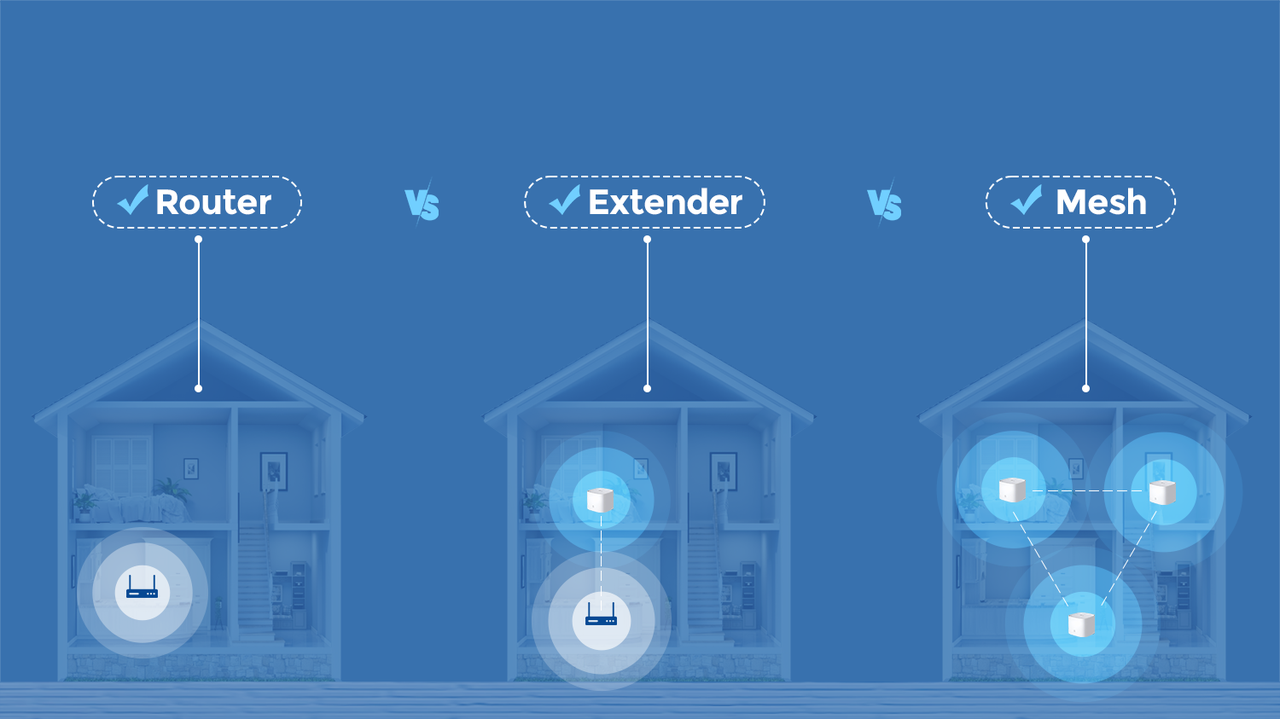
5. Wi-Fi Extenders Often Make Things Worse

Many Brooklyn residents try to fix Wi-Fi issues with range extenders or signal boosters. Unfortunately, these devices often:

  • Cut bandwidth in half

  • Create separate networks

  • Introduce latency

  • Drop connections as devices roam

Instead of solving the problem, extenders often add complexity without real improvement.

What Is a Mesh Wi-Fi System?
Why Wi-Fi Is Unreliable in Brooklyn Apartments

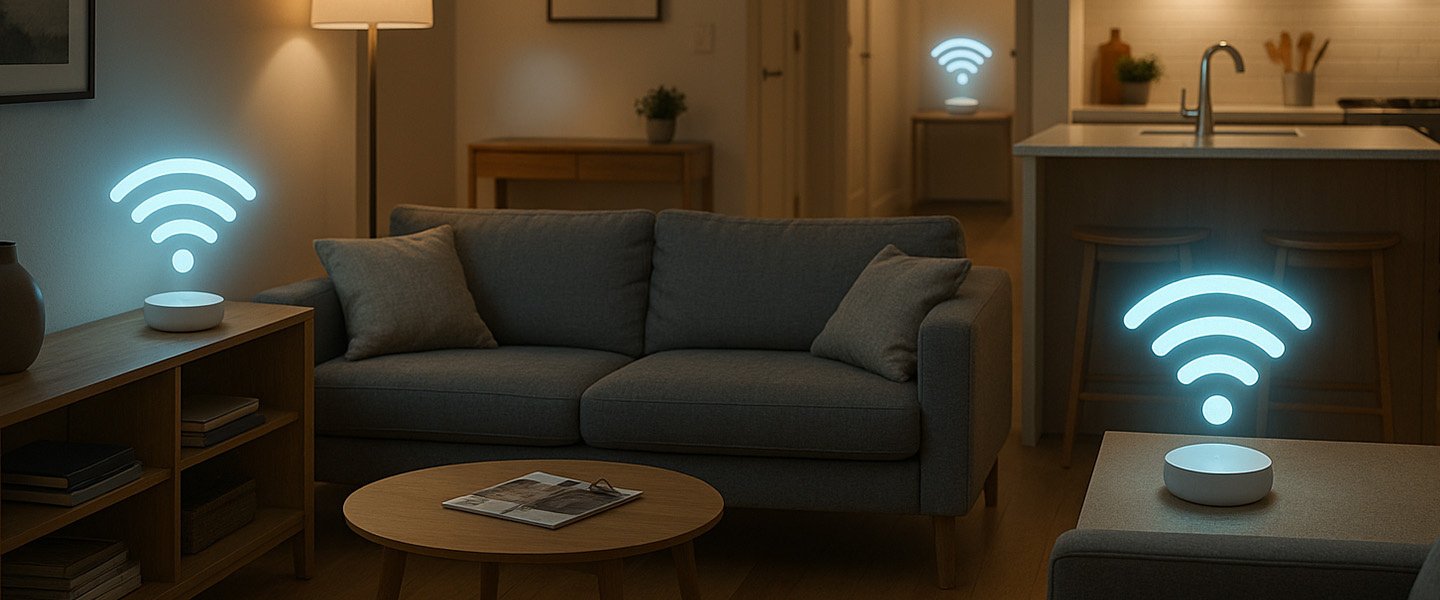
A mesh Wi-Fi system replaces the single-router model with multiple access points called nodes that work together as one unified network.

How Mesh Wi-Fi Solves Brooklyn Apartment Problems

Mesh Wi-Fi systems are uniquely suited for Brooklyn’s architectural and environmental challenges.

1. Multiple Access Points Defeat Thick Walls

By placing nodes in strategic locations—such as hallways, bedrooms, or offices—mesh systems reduce the distance Wi-Fi signals need to travel.

Instead of trying to penetrate multiple brick walls, each node covers a smaller area more effectively.

2. Seamless Coverage in Long or Closed Layouts

Mesh nodes can be placed along the length of narrow apartments, ensuring even coverage from front to back.

This works especially well in:

  • Railroad-style apartments

  • Multi-room floor plans

  • Duplex or split-level units

3. Better Performance in High-Interference Environments

Most mesh systems intelligently manage:

  • Channel selection

  • Band steering (2.4 GHz vs 5 GHz)

  • Load balancing between nodes

This helps reduce interference from neighboring networks and ensures devices always connect using the best available path.

4. Ideal for Security Cameras and Smart Devices

For apartments using:

  • IP security cameras

  • Video doorbells

  • Smart locks

  • Motion sensors

  • Remote monitoring systems

Mesh Wi-Fi provides the stable, always-on connectivity these devices require.

5. Smooth Roaming for Mobile Devices

Unlike extenders, mesh systems allow phones, laptops, and tablets to move freely throughout the apartment without disconnecting or buffering.

This is especially important for:

  • Video calls

  • VoIP

  • Cloud applications

  • Streaming services

Mesh Wi-Fi vs Traditional Router vs Extender

FeatureTraditional RouterWi-Fi ExtenderMesh Wi-Fi
CoverageLimitedModerateExcellent
RoamingPoorPoorSeamless
Speed ConsistencyUnevenReducedConsistent
ScalabilityLowLowHigh
Security Camera SupportWeakUnstableStrong

Mesh Wi-Fi vs Traditional Router vs Extender

When Should Brooklyn Residents Upgrade to Mesh Wi-Fi?

Mesh Wi-Fi is especially recommend if:

  • Your apartment has dead zones

  • Wi-Fi drops in certain rooms

  • You use security cameras or smart home devices

  • Multiple people work from home

  • Streaming or gaming performance is inconsistent

  • Extenders didn’t solve the problem

Wi-Fi problems in Brooklyn apartments aren’t cause by bad internet plans or outdated devices—they’re the result of dense construction, interference, and outdated networking models.

Traditional routers simply aren’t built for Brooklyn’s unique challenges.

Mesh Wi-Fi systems offer a proven solution by delivering:

  • Whole-apartment coverage

  • Stable performance

  • Seamless roaming

  • Reliable support for security and smart devices

👉 Contact with us to design a mesh Wi-Fi solution to your apartment and security needs.

Secure IT Global LLC
Brooklyn, NY

(888) 902 2303

customerservice@secureitglobal.com

Remote IT Setup & Troubleshooting

Many small businesses, Remote IT Setup & Troubleshooting has become an important part of daily operations. Whether employees work from the office, home, or multiple locations, businesses need reliable systems that can be supported quickly and securely.

Secure IT Global provides IT support, computer repair, CCTV solutions, website support and business technology services for customers in Brooklyn, NY. Located at 3603 Avenue S, Brooklyn, NY 11234, Secure IT Global helps local small businesses set up, troubleshoot and manage technology more effectively.

Remote IT Setup & Troubleshooting

What Is Remote IT Setup & Troubleshooting?

Remote IT support means a technician diagnoses and fixes computer, network, or software issues from a different location — connecting to your device securely over the internet instead of visiting in person.

This covers a wide range of services, including:

  • Device and software setup — new computers, printers, email accounts, and business applications
  • Network configuration — Wi-Fi, routers, VPNs, and secure business connections
  • Troubleshooting errors — slow performance, crashes, connectivity issues, software conflicts
  • Security fixes — malware removal, firewall setup, and patching vulnerabilities
  • Cloud and software support — Microsoft 365, Google Workspace, POS systems, and more

How Remote IT Support Works: Step by Step?

  1. You submit a support request— by phone, email, or a support ticket describing the issue.

  2. A technician connects securely — using encrypted remote-access software, with your permission required before any connection is made.
  3. Diagnosis and troubleshooting — the technician identifies the root cause, not just the symptom.
  4. The fix is applied remotely — most issues (software errors, settings, network configuration, security patches) can be resolved without anyone stepping into your office.
  5. Follow-up and documentation — you receive a summary of what was fixed and recommendations to prevent it from happening again.

Benefits of Remote IT Setup & Troubleshooting

1. Faster Response Times

No waiting for a technician to drive to your location. Many issues can be resolved the same hour they're reported.

2. Lower Cost

Remote support eliminates travel time and on-site labor costs, which typically means lower rates passed on to you.

3. Minimal Business Disruption

Your team can often keep working while smaller issues are resolved in the background.

4. Support From Anywhere

Whether you have one office or multiple locations — even remote or hybrid employees — remote IT support can help everyone, regardless of where they're working from.

5. Faster Access to Specialists

Instead of being limited to whoever is available locally, remote support can connect you with the right specialist for your specific issue.

When Remote Support Isn't Enough?

Remote IT Setup & Troubleshooting services solve the vast majority of small business tech issues, but a few situations still require someone on-site, such as:

  • Physical hardware failures (replacing parts, cabling, hardware installs)
  • Complete network outages where there's no internet connection to remote into
  • New office builds requiring physical wiring or equipment setup

Is Remote IT Support Secure?

This is one of the most common concerns small business owners have, and it's a fair one. Reputable Remote IT Setup & Troubleshooting providers use:

  • Encrypted connections so data can't be intercepted during a session
  • Permission-based access — nothing happens without you approving the connection
  • Session logging so there's a clear record of what was done
  • Strict data handling policies to protect sensitive business and customer information

How Secure IT Global Delivers Remote IT Setup & Troubleshooting?

Secure IT Global combines the responsiveness small businesses need with the trust and accountability of working with a local company.

✅ Fast, Reliable Remote Support

Our team resolves most software, network, and setup issues remotely — often the same day you reach out — so your business gets back to normal fast.

✅ Affordable Pricing Through Our Hybrid Model

By combining local project management with a skilled hybrid team, we keep remote support pricing accessible for small businesses without cutting corners on quality.

✅ Secure by Design

Every remote session is encrypted, permission-based, and documented, so you always know what was done and why.

✅ More Than Just Troubleshooting

Remote support is just one part of what we offer. Secure IT Global also provides:

  • E-Commerce Solutions — custom, secure online stores
  • Website Development — professional, mobile-friendly websites
  • Local Business Search Optimization — helping local customers find you online
  • Ongoing IT Support — remote and on-site help when you need it


Contact Secure IT Global today to get your IT issues resolved quickly, without the wait or the high cost of traditional on-site service.

We help small businesses with IT support, computer repair, website support, CCTV systems, surveillance products, and business technology needs.

Our local business is located at:

Secure IT Global
3603 Avenue S
Brooklyn, NY 11234
Website: secureitglobal.com

Secure IT Global Can Help

We can help with:


What is remote IT setup?

Remote IT setup means configuring business technology so users can work, access files, use email, connect to systems, and receive support without always needing an in-person technician.

Yes. Small businesses can use remote IT support for email issues, software troubleshooting, cloud access, remote desktop setup, password help, device configuration, and many common computer problems.

Many issues can be reviewed remotely, including software errors, email problems, cloud access, remote login problems, security settings, slow computer checks, printer settings, and user account issues.

Remote IT support can be safe when handled by a trusted provider using secure tools and proper permission. Businesses should never allow unknown callers or unverified people to access their computers.

Yes. Secure IT Global provides IT support, computer repair, troubleshooting, and business technology help for customers in Brooklyn, NY.

Secure IT Global is located at 3603 Avenue S, Brooklyn, NY 11234 and serves Brooklyn customers. Some technology issues may be handled remotely, while others may require local hands-on support.

Shopping cart
WhatsApp WhatsApp
Start typing to see posts you are looking for.
0 items Cart
My account