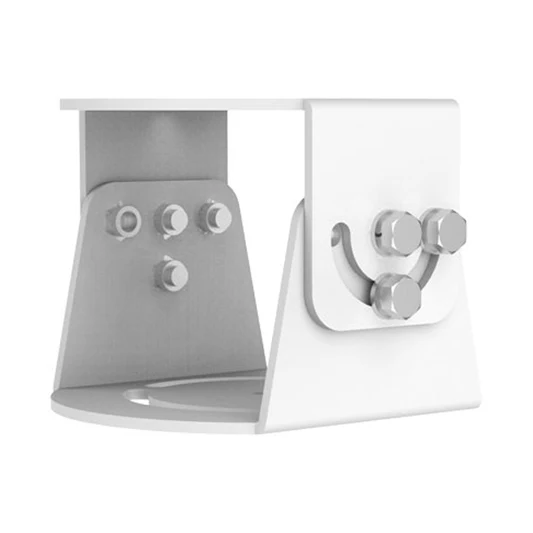
Uniview TR-UV06-C-IN OmniView IP Camera 2D Bracket Mount Security Accessory
Uniview TR-UV06-C-IN OmniView Accessory for IP Camera.
Key Features:
- Type: Bracket Mount
- Dimensions: 225.0mmx111.3mmx150.6mm(8.9” x 4.4”x 5.9”)
- Weight: 0.58kg (1.28lb)
- Material: Aluminum alloy’
Improving Home Security Systems Audio and Visual Quality
Description:
In today’s rapidly evolving world security is paramount. An effective surveillance system is essential whether you’re security your home, office or business location. The Uniview Mount offers a cutting edge solution to enhance your security infrastructure. The TR-UV06-C-IN is a Bracket pole or rail installation Mount for OmniView Multi Sensor Network Cameras make video surveillance easier to use .It is made from Aluminum alloy is covered with Silver color. This Bracket is to house or conceal camera connections when installing security cameras. This connections are more secure and protected. This Bracket is Weatherproof so you can use it for indoor or outdoor . Investing in a durable bracket mount ensures that your IP camera remains securely in place, even during adverse weather conditions. It comes with a user-friendly manual and all the necessary accessories making the installation process straightforward.
Installation:
Ensure you have all the necessary tools and parts including screws and anchors. Identify the mounting location ensuring it provides the desire field of view and is structurally sound. Attach the bracket to the desire surface using the provided screws and anchors. Connect the camera to the bracket. Depending on the specific model this may involve sliding the camera onto the bracket or securing it with additional screws. Adjust the camera’s position using the 2D bracket’s horizontal and vertical adjustments to achieve the optimal field of view. Tighten all screws and ensure the camera is securely mounted. Connect the camera to the network and power source then test the camera to ensure it is functioning correctly and position as desired.
Buy Uniview TR-UV06-C-IN OmniView Mount from Secure IT Global. We have a large collection of the latest Uniview Products for your Security System.
Rated 0 out of 5
0 reviews
Only logged in customers who have purchased this product may leave a review.








Reviews
Clear filtersThere are no reviews yet.